
A.O. Smith iCOMM App: Features, Setup & Compatibility
Quick answer: The A.O. Smith iCOMM™ app lets owners of compatible connected water heaters monitor and, where supported, adjust settings from a smartphone. Features can include temperature and operating-mode controls, scheduling, alerts, and diagnostic information. Not every A.O. Smith water heater supports iCOMM.
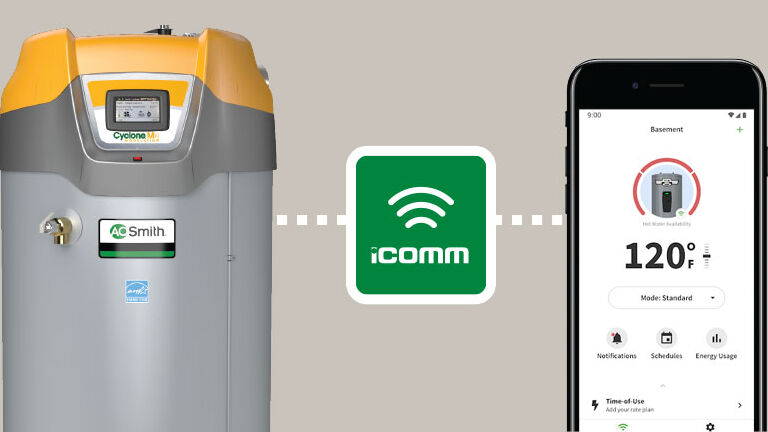
This article originally covered the commercial iCOMM platform in 2018. A.O. Smith has since expanded its connected-water-heater offerings, so we have updated the information and app links for today’s homeowners and service professionals.
What can the A.O. Smith iCOMM app do?
- Remote monitoring: View supported water heater status and temperature information.
- Adjust settings: Change temperature or operating modes on models that allow those controls.
- Manage schedules: Use available scheduling and time-of-use features on compatible equipment.
- Receive alerts: Review certain diagnostic or fault notifications when supported by the heater and connection.
- Professional tools: A.O. Smith describes connectivity and product-support tools for service professionals.
Available controls vary by model, app version, and connection. The app does not add Wi-Fi capability to a water heater that was not designed for iCOMM. See A.O. Smith’s official iCOMM overview for the manufacturer’s current feature information.
Which water heaters work with iCOMM?
iCOMM is available on certain connected residential and commercial models, including selected heat-pump, smart electric, and commercial water heaters. The earlier version discussed in this article focused on A.O. Smith’s Cyclone commercial line. Current connected models include certain Cyclone water heaters, but compatibility must be confirmed for the exact model and series, not just the A.O. Smith brand.
Check the water heater’s rating plate, product documentation, and connectivity markings. If you’re considering a replacement, ask about smart features before choosing the model: Wi-Fi and app compatibility should be part of the equipment selection, not an assumption.
How to download and connect the iCOMM app
The original 2018 download links are outdated. These are the current iCOMM Connectivity app listings from A.O. Smith:
- iCOMM Connectivity for iPhone and iPad (Apple App Store)
- iCOMM Connectivity for Android (Google Play)
- Confirm your water heater model is iCOMM-enabled and has the required connectivity.
- Install the official app and follow its account sign-in or registration prompts.
- Use your water heater’s specific instructions to put it into pairing or Wi-Fi setup mode.
- Follow the in-app instructions to connect the heater and finish setup.
- Check that the unit appears in the app and that supported settings and alerts are available.
If setup fails, confirm that the phone and home network meet the requirements in your model’s manual. Pairing steps and supported Wi-Fi networks can vary; consult A.O. Smith’s app setup and connectivity instructions where applicable rather than resetting controls at random. For app-account or server-side problems, contact A.O. Smith support through the official app listing or manufacturer website.
Watch: A.O. Smith iCOMM video
Here is the A.O. Smith video about its connected water heater technology.
Common iCOMM questions
Does every A.O. Smith water heater have iCOMM?
No. Only certain models include supported connectivity. Check the exact model’s specifications and user manual before downloading or attempting setup.
Can I adjust my water heater’s temperature from my phone?
Some iCOMM-enabled models allow remote temperature or operating-mode adjustments. The available settings depend on the heater model and app. Keep water-temperature safety and scalding risk in mind.
Does iCOMM work if my internet connection is down?
Remote app features depend on the supported network connection and service availability. Your water heater’s local controls and normal operation are separate from the convenience of monitoring it remotely; consult the model manual for details.
What should I do if the app cannot find my water heater?
Verify the heater supports iCOMM, check that its connection is enabled, and follow the model-specific setup guide. If your account, sign-in or pairing still fails, request technical help from A.O. Smith.
Can a plumber help me choose a connected water heater?
Yes. A licensed plumber can help determine the correct size, fuel type and model for your home, then confirm which connectivity features are actually available on that equipment.
A.O. Smith water heater installation in Palm Beach County
Water Heating Experts LLC helps homeowners in Palm Beach Gardens, Jupiter, Tequesta, Juno Beach and nearby communities select and professionally install water heaters. If smart controls matter to you, we can discuss model compatibility alongside hot-water capacity, operating costs and installation requirements. Read about our A.O. Smith water heater installation and replacement services.
Questions about replacing your water heater? Call 561-602-9062 to discuss your installation needs with Water Heating Experts. For app login or cloud-service issues, A.O. Smith is the appropriate technical support contact.
Updated October 2026. Features, supported models and store listings may change; always refer to the current manufacturer documentation.